
My journey on developing widgets for the French national railway app
Cet article est aussi disponible en français.
SNCF Connect is the application of the SNCF (Société Nationale des Chemins de fer Français / French National Railway Company) which is the result of the merger of two apps: OUI.sncf and L’Assistant SNCF. The first one dealt with booking train tickets (regional, high-speed, or European trains), while the other was to plan your door-to-door trip, import all of your bookings regardless of where you bought them, see the timetables of your favorite stations, and so on.
SNCF Connect is the only app now that can do both scopes of those legacy apps. It is also the first travel commercial app in France.
This post is going to detail the creation of widgets inside our development team, from their first designs to their deployment to our users.
SNCF Connect hackathons
The idea of widgets is not new. In L’Assistant SNCF, we had several of them, from the emergency SNCF number, your station timetables, to one-click access to your e-ticket. Unfortunately, with the end of this application, we knew that some of our users were going to miss those functionalities. But what’s the deal with hackathons? Let me explain.
To sum up, every year we have an internal hackathon where everyone can participate and vote for their favorite project. The winning project could potentially be integrated into the SNCF Connect app. It is a great way to cultivate our ideas and add new unique features. In June 2022, a new hackathon began, and one of the favorite ideas was widgets.
The first widget idea was a station timetable. It was one of the most used widgets during the l’Assistant SNCF app cycle life, and we wanted to integrate this to SNCF Connect. The idea needed to maturate a bit before starting the development, because we needed first to integrate all of the essential features of the L’Assistant SNCF app into SNCF Connect, since the old application will be terminated the 29th August 2023. But it was a good start, and clearly a request from our users.
Ma vie serait tellement meilleure si SNCF Connect avait un widget
— 𝓒𝓪𝓹𝓾𝓬𝓲𝓷𝓮 🌌 (@caplldwl) December 19, 2023
“My life would be so much better if SNCF Connect had a widget”
Bonjour, pourriez-vous vous faire remonter le besoin de widget pour les tableau d'arrivées/departs en gare svp ? C'était bien pratique sur l'assistant et c'est absent de sncf connect :(
— Vincent Zuba (@Alich0u) August 29, 2023
Merci, bonne matinée
“Hello, could you please let us know about the need for a widget for station arrival/departure boards? It was very useful in the assistant, but it’s missing from SNCF Connect :(“
I joined the team that was responsible for the transition of the old app features to the new one. The 3rd of July was my first day in this team, and ironically, it was the day when they completed all of L’Assistant SNCF features transition. Since this team had finished their scope, they needed a new one. Our new scope was now “Notifications and widgets.”
From the first design to our first production launch
Our design team started to imagine what could potentially be our future station timetable widgets. It was frankly a whole new process of work, since we were all used to developing and imagining features for an application, not a widget.
We also needed to understand that we are developing our application using Flutter’s framework, that allows our different developers to code with only one language for both our iOS and Android apps. But this framework has its own limitations, and widgets are one of them. They needed to be completely written in their native language (Kotlin/Java for Android and Swift for iOS).
Fortunately, thanks to the community, there is a plugin called home_widget that enables communication between Flutter code and the widget’s native code. For the initial iterations, we used this plugin to call our backend and access user preferences. We later replaced it with a native helper that handled backend communication by abstracting our Dart code. This made the widget more efficient and, for example, enabled nearly instant refresh on iOS.
As my team’s developer had a background in iOS development, we decided that they should handle the iOS development part, while I could focus on the Android. It was clearly a new challenge for me since I had never touched any Android development workflow before this experience and needed to learn quickly how to create those widgets. Since the design team began iterating on the widget’s UI — a process that required some time — I took the opportunity to explore the key technical aspects of Android widgets in more depth.
This article is going to talk only about the Android version, since I only developed this one.
After some weeks, our team received the first version of the widget’s UI.
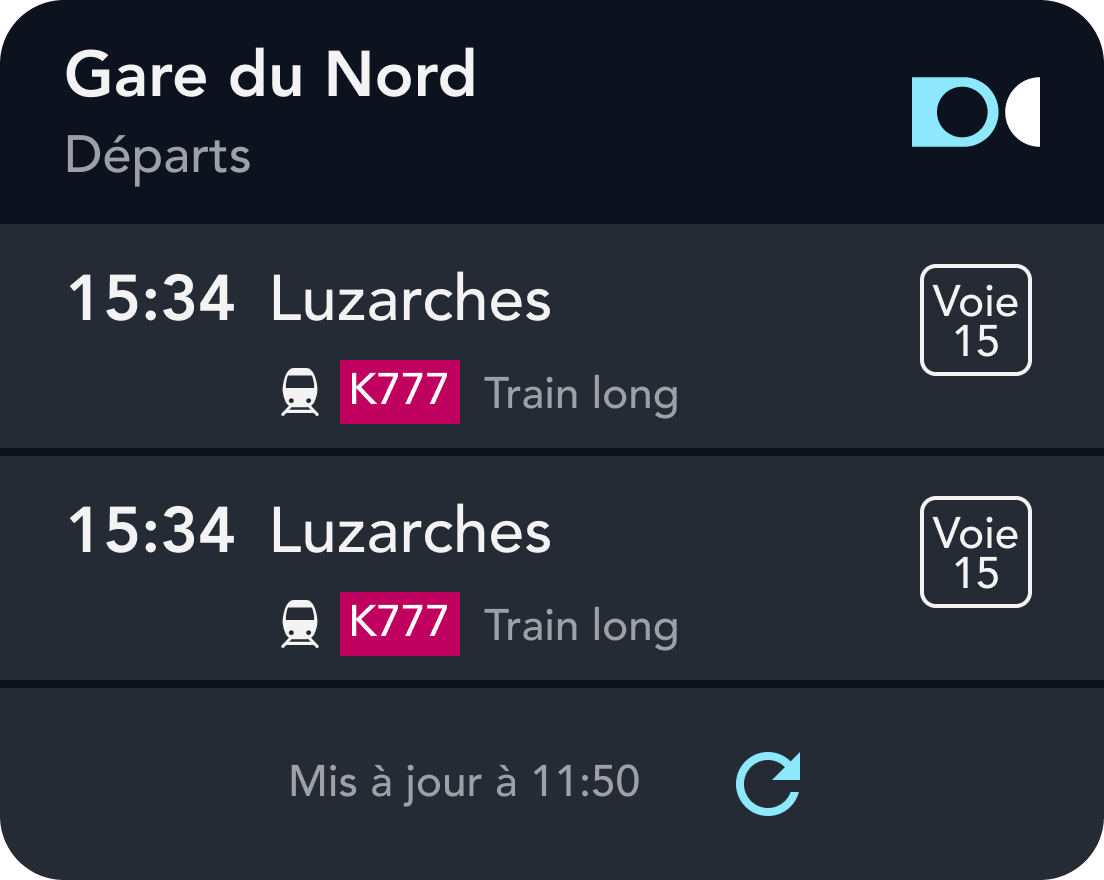
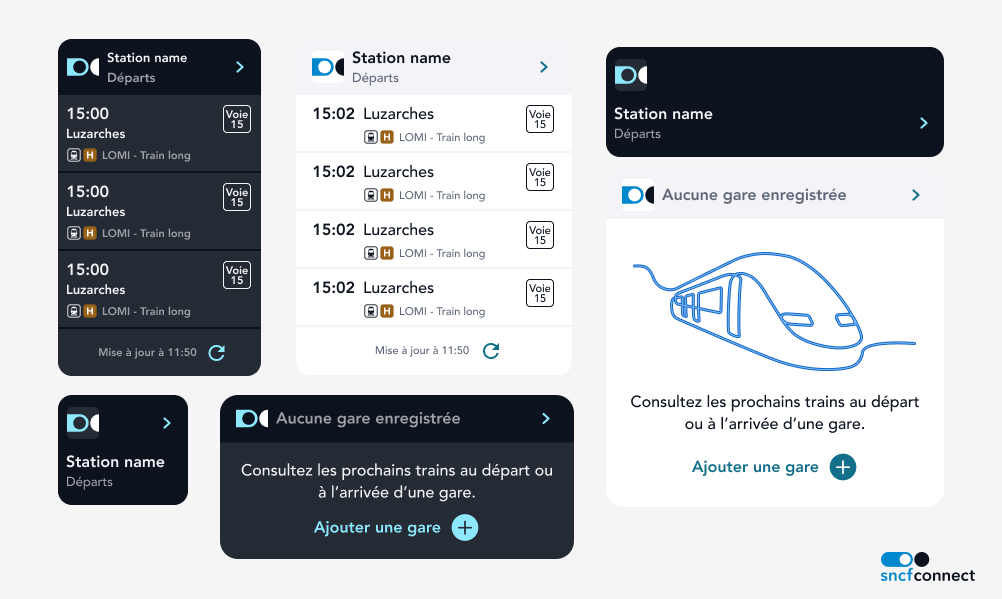
It was decided to do some iterations. We wanted to test the user response and monitor the attraction of this new functionality. For our first version, we could have only one station and only one size. This restriction was to have a quick first version before the end of L’Assistant SNCF and get some feedback for future evolutions.
Deploying the widget to production
On October 11, 2023, version 79 of SNCF Connect was available on the Google Play Store. This version included the very first SNCF Connect widget… and an anomaly. To sum up, we observed thanks to our analytic tools that if a person updated the app and installed the widget without launching the app first, it would cause a crash.
Since our tests were concentrated on installing a fresh new app every time, we never detected this bug, nor considered this use case (but at least our tests are consolidated now). We found out that the issue came from a Flutter dependency we were using to save and communicate data from our app to the widget. We created a pull-request to this plugin to fix this issue. The bug was fixed and embedded in the next SNCF Connect release.
From one size to multi sizes
As we had good feedback, our design team continued to iterate on the widget. It was decided to allow the user to have smaller sizes, and for sizes that were too small to show any timetable, to become a shortcut for opening the application.
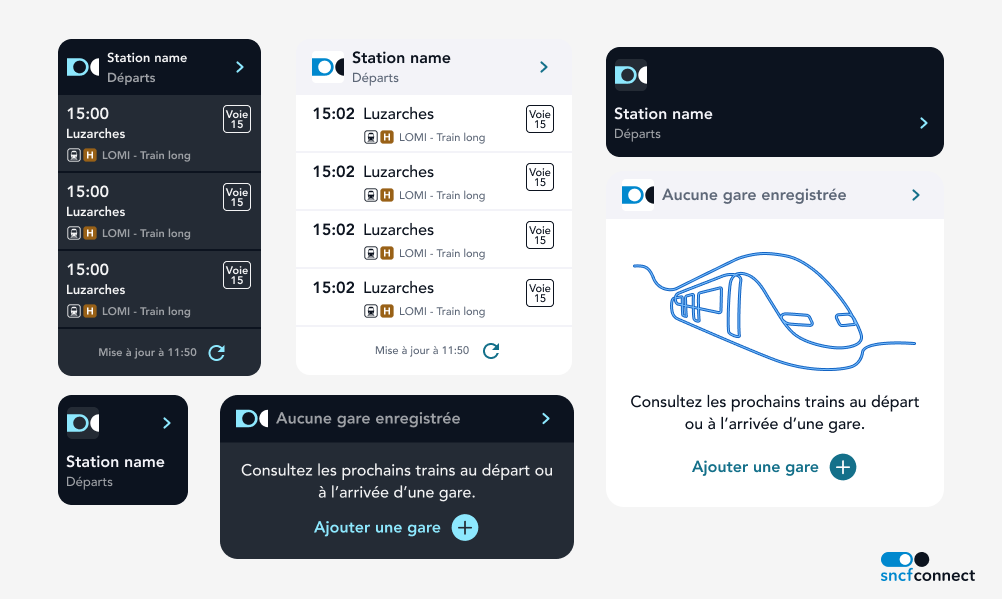
As we didn’t have an Android function to get precisely the size of widgets in cell size on the home screen, we made a little custom class to handle this case:
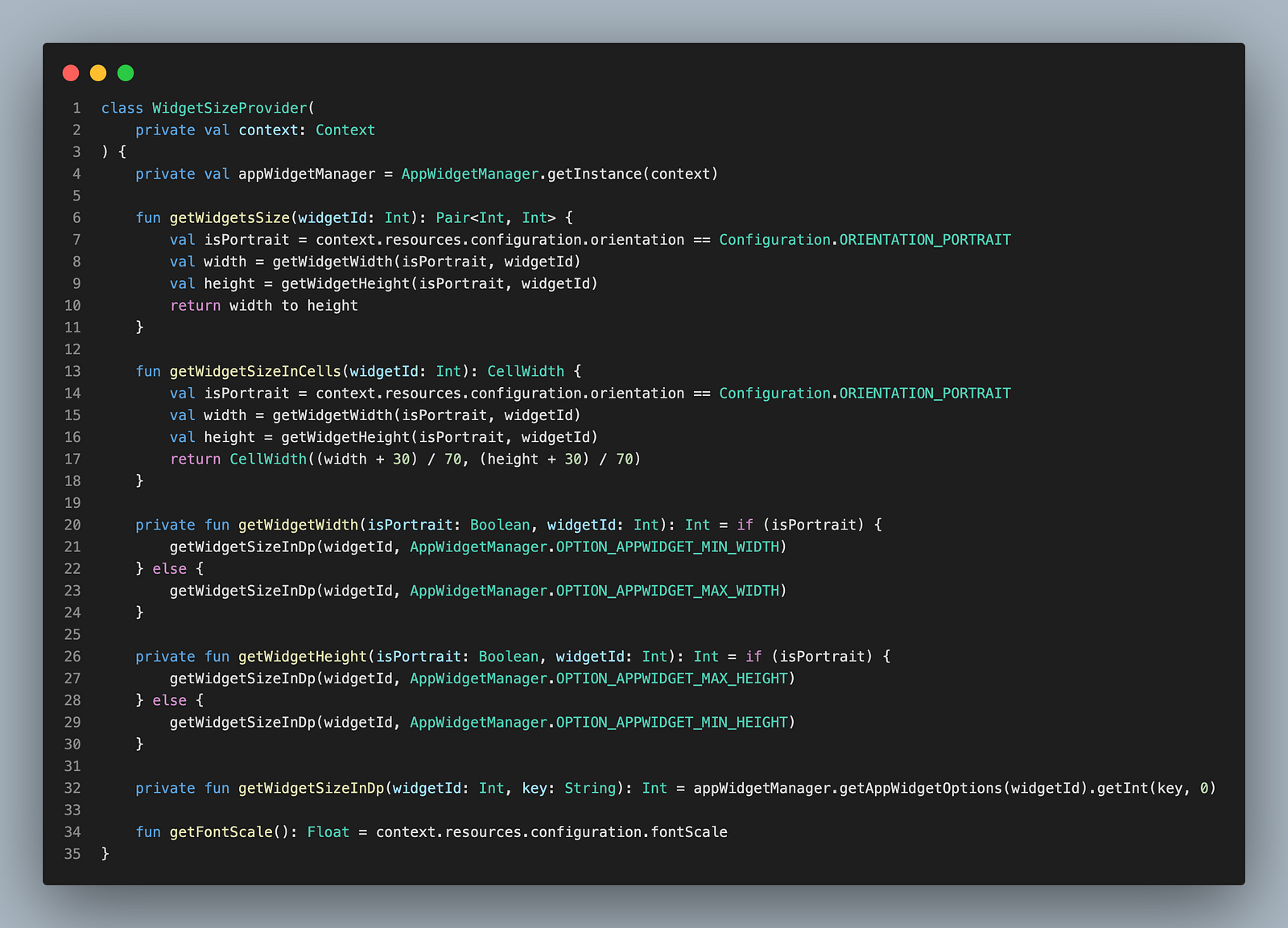
Now, whenever the user resizes the widget, the UI is rebuilt to display the appropriate layout based on the new size.
From XML to Jetpack Glance
On May 14, 2024, the Google I/O, the annual Google show to present its new products and evolutions was held. As I started digging into Android development, I decided to follow the news about not only the Flutter framework, but also the core new features of Android development — one of them being Jetpack Compose.
Before Jetpack Compose, you had to declare all of your layouts in XML and play with them in Kotlin to render your screens and components. The UI and logic were separated (and to be honest, it was clearly a pain point while developing the widget on SNCF Connect). But then came Jetpack Compose: it’s a modern Android toolkit for building native user interfaces using a declarative programming model. I find it very similar to Flutter.
And the Google Team didn’t forget about the widget, because they announced Jetpack Glance. It’s a new library that brings the declarative UI paradigm of Jetpack Compose to App Widgets. As widgets haven’t evolved since the first version of Android, they can’t really support new features, but this constraint allows for simpler development, better maintainability, and significantly less code.
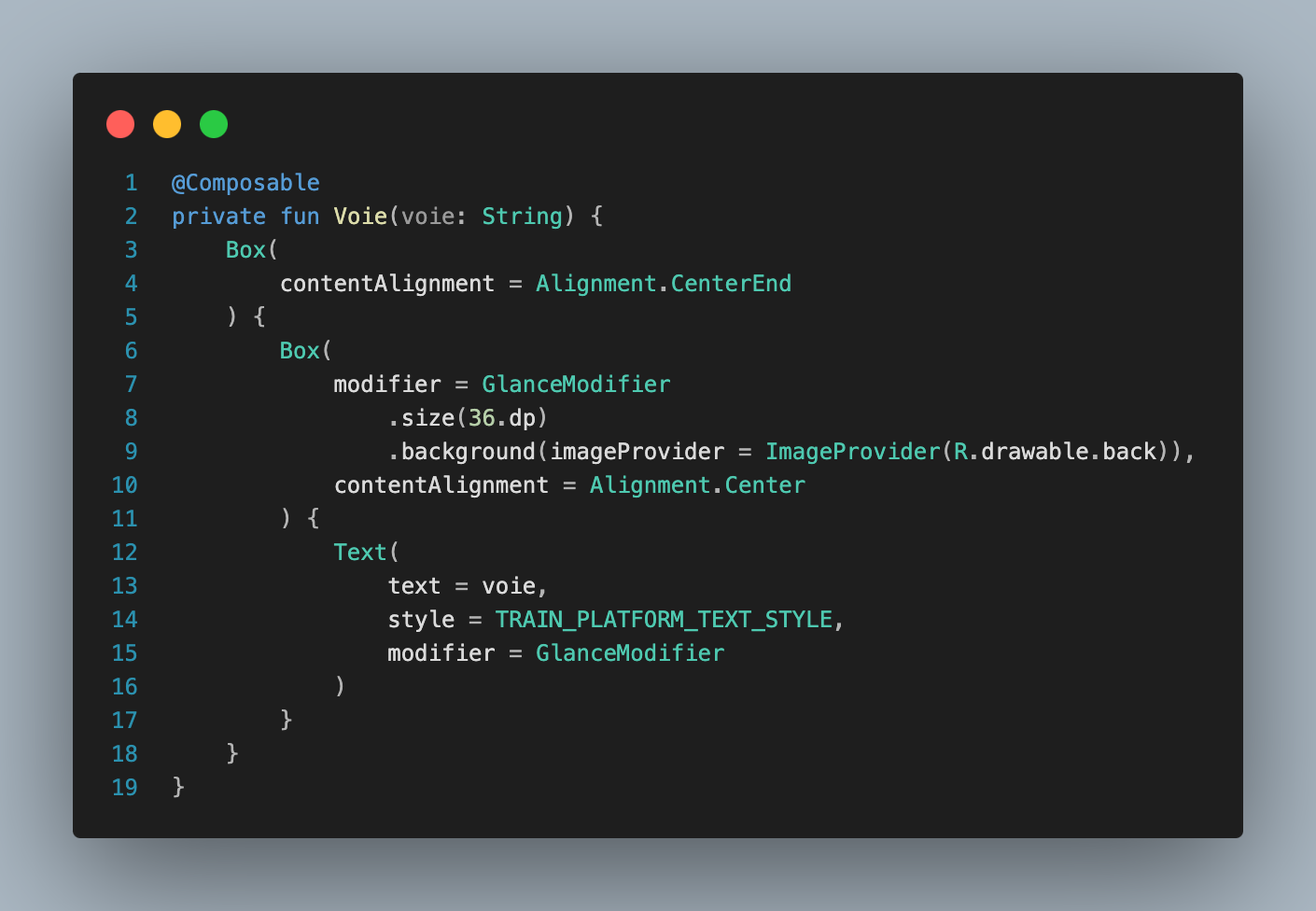
That’s when I decided to challenge myself by rewriting our widget using Jetpack Glance — and it exceeded all my expectations! Jetpack Glance still requires further development, as it doesn’t yet support all the features available with XML, but once that’s addressed, I hope to roll out this new version to our end users.
User Engagement
It took off quickly! We received a lot of positive feedback on the new feature and were thrilled by the engagement. We mainly relied on Twitter for feedback, as we chose not to actively promote the feature and instead let users discover the widget on their own until we were sure that everything was working as expected.
After a while, we promoted it on the SNCF Connect app to allow everyone to discover this wonderful addition and take full advantage of its benefits.
Le savez-vous ?
— Plus de trains (@Plusdetrains) May 18, 2025
Avec les widgets de l’appli SNCF Connect vous pouvez voir rapidement des prochains RER ou Transilien au départ de votre gare, en filtrant sur la destination. Ça marche sur iOS et sur Android. pic.twitter.com/UjlHIhmiZW
A famous railway user account (+35k followers) presenting the SNCF Connect widget to its community
il est full fonctionnel sur Android :)
— ProfEuphorbe- David (@ProfEuphorbe) January 8, 2024
“[The widget] is full working on Android”
We received a great number of positive reviews from several social media posts. And our data show the same!
Here is a graph showing the number of calls our backend received over a week from unique phones with widgets installed. The pink illustrates phones on Android while purple is for iOS. Although I could write an entire other article about data and how fascinating it is, let’s stay focused on our subject.
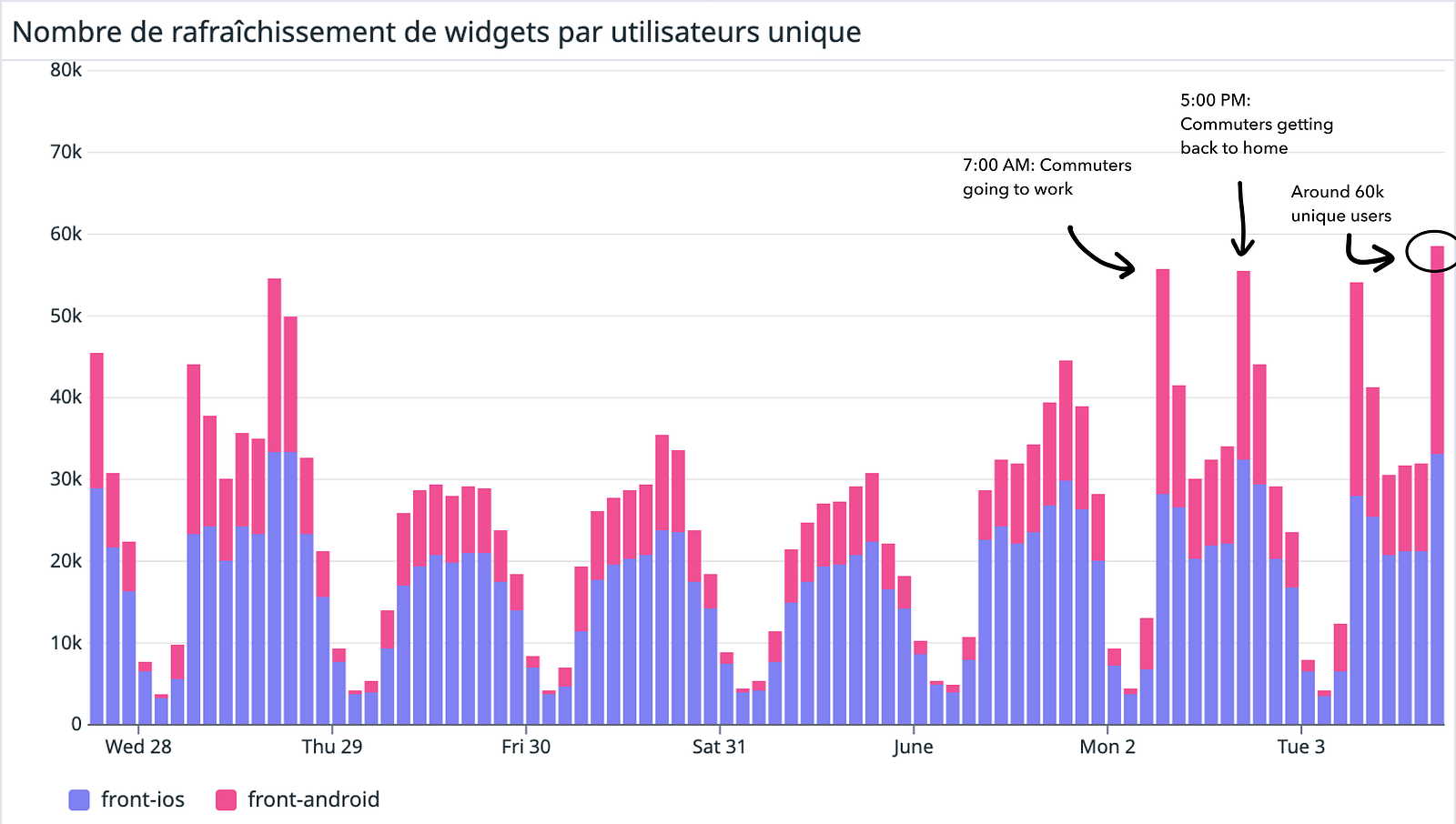
As we can see, we have for Wednesday, Monday, and Tuesday two spikes. I highlighted them on the graphic. The first one is around 7:00 AM and the second one at 5:00 PM: the times when commuters start taking public transport for work. And it’s fascinating, we can clearly see that the widget is checked when it’s most necessary for the traveler.
We can also observe an average of 60,000 phones requesting an update. This gives us a rough estimate of how many users interacted with the widget during those peak moments, but it’s only indicative — usage may vary throughout the day or be spread differently across the week.
And you may ask yourself: but why wasn’t the widget used from Thursday to Sunday? Well, this specific Thursday was a holiday in France, and a lot of workers decided to do what we call a “pont”: take Friday as a day off so we can have four days off (from Thursday to Sunday). It explains why the widget wasn’t used as usual!
And what’s next?
Unfortunately I had to delegate the development of Android widgets to another team, since I moved to another exciting project.
But I’m still keeping an eye on this feature, and I can tell you that the next developments are going to be very interesting!
It was truly an enriching experience, especially since it was the first major feature I was able to develop for SNCF Connect. We had to overcome several issues, headaches, and bugs, but we did everything we could to provide our users with a feature that allowed them to take ownership of the application and make their commuting life easier. I am very proud of what my team has achieved. I thank them so much for everything!
And thank you very much for reading this article! Don’t hesitate to check the other posts we have on our Medium!